Built-in geometrical objects in LaMEM
One way to generate an input geometry is to use the built-in geometrical objects in LaMEM. These geometries are used if the option
msetup = geomis specified in the input file.
A number of geometric primitives exists within LaMEM, and can be combined, with the ones further down in the input scripts overwriting earlier ones. This allows you, for example, to first set a halfspace cooling temperature for the lithosphere and afterwards defined the crust, mantle lithosphere etc.
The following objects are available:
Sphere
Specifying a sphere comes with the following options:
<SphereStart>
    phase       = 1
    radius      = 1.5
    center      = 1.0 2.0 3.0

    Temperature = constant # optional: Temperature of the sphere. possibilities: [constant]
    cstTemp     = 1000     # required in case of [constant]: temperature value [in Celcius in case of GEO units]
<SphereEnd>
Layer
Allows you to specify a horizontal layer in the model
<LayerStart>
    phase       = 1
    top         = 5.0
    bottom      = 3.0

    # optional: sinusoidal perturbations
    cosine      = 0         # optional: add a cosine perturbation on top of the interface (if 1)
    wavelength  = 1         # required if cosine: wavelength in x-direction
    amplitude   = 0.1       # required if cosine: amplitude of perturbation

    # optional: temperature structure
    Temperature = halfspace # optional: Temperature structure. possibilities: [constant, linear, halfspace]
    cstTemp     = 1000      # required in case of [constant]: temperature value [in Celcius in case of GEO units]
    topTemp     = 0         # required in case of [linear,halfspace]: temperature @ top [in Celcius in case of GEO units]
    botTemp     = 1300      # required in case of [linear,halfspace]: temperature @ bottom [in Celcius in case of GEO units]
    thermalAge  = 70        # required in case of [halfspace]: thermal age of lithosphere [in Myrs if GEO units are used]
<LayerEnd>
Box
Allows you to define a square box:
<BoxStart>
    phase       =   1		    # required; phase of box
    bounds      =   0 1 0 1 0 1	# required: left right front back bottom top

    Temperature =   linear      # optional: Temperature structure. possibilities: [constant, linear, halfspace]
    cstTemp     =   1000        # required in case of [constant]: temperature value [in Celcius in case of GEO units]
    topTemp     =   0           # required in case of [linear,halfspace]: temperature @ top [in Celcius in case of GEO units]
    botTemp     =   1300        # required in case of [linear,halfspace]: temperature @ bottom [in Celcius in case of GEO units]
    thermalAge  =   70          # required in case of [halfspace]: thermal age of lithosphere [in Myrs if GEO units are used]
<BoxEnd>
Hexahedral
Allows you to define a hexahedral object (which requires you to specify 8 edge points), in the following order:
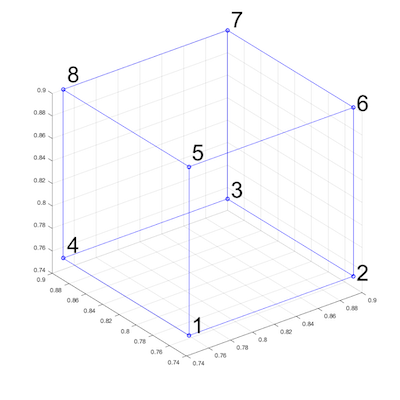
<HexStart>
    phase   = 1             # required; phase of box

    # required: coordinates of the 8 edge points
    coord   = 0.75 0.75 0.75   0.9 0.75 0.75   0.9 0.9 0.75   0.75 0.9 0.75   0.75 0.75 0.9   0.9 0.75 0.9   0.9 0.9 0.9   0.75 0.9 0.9
<HexEnd>
Cylinder
Allows you to insert a cylinder-like object:
<CylinderStart>
    phase       = 1             # required; phase of box
    radius      = 0.3           # required: radius of cylinder
    bottom      = 0.1           # required: z-coordinate of bottom of the layer
    base        = 0.1 0.1 0.1   # required: (x,y,z)-coordinate of point at base of cylinder
    cap         = 0.1 0.1 0.8   # required: (x,y,z)-coordinate of point at cap of cylinder

    Temperature = constant      # optional: Temperature of the sphere. possibilities: [constant]
    cstTemp     = 1000          # required in case of [constant]: temperature value [in Celcius in case of GEO units]
<CylinderEnd>
Ellipsoid
<EllipsoidStart>
    phase       = 1
    axes        = 2.0 1.5 1.0  # semi-axes of ellipsoid in x, y and z
    center      = 1.0 2.0 3.0

    Temperature = constant     # optional: Temperature of the sphere. possibilities: [constant]
    cstTemp     = 1000         # required in case of [constant]: temperature value [in Celcius in case of GEO units]
<EllipsoidEnd>
Mid-run injection with n_inject and t_inject
Every primitive listed above accepts two optional parameters: n_inject, the number of simulation times at which the primitive is stamped onto the markers, and t_inject, the times themselves:
<SphereStart>
    phase       = 2
    center      = 20.0 50.0 80.0
    radius      = 15.0
    n_inject    = 2              # number of injection times
    t_inject    = 2.0 4.0        # [Myr in GEO units] inject at 2 and 4 Myr

    Temperature = constant       # optional, as for any other primitive
    cstTemp     = 800
<SphereEnd>
Without n_inject (the default) the primitive defines the initial geometry exactly as described in the sections above, so existing input files are unaffected.
With n_inject > 0 the primitive is not applied at initialization. At the beginning of the first time step whose simulation time reaches each listed value, the phase of every marker inside the primitive is overwritten, together with the temperature if a Temperature option is given. Each listed time fires exactly once, so a body can be injected repeatedly. Up to 10 times may be given, in strictly increasing order. To have the same body both at t = 0 and injected later, write two blocks.
Three further points are worth noting:
- Deformation history is reset. Injected material is treated as newly emplaced, so the accumulated plastic strain, the accumulated total strain and the deviatoric stress of the affected markers are set to zero. Their pressure and displacement are left untouched.
- Overlapping primitives are applied in the order of appearance in the input file. If two primitives are injected at the same time and overlap in space, the one written last wins. This is the same rule that applies to primitives at initialization.
- Restarts are handled. The injection times that have already fired are stored in the restart database, so a restarted run neither repeats an injection that has already happened nor loses one that is still pending.
Injected primitives are read for every marker setup type, not only for msetup = geom. A model whose initial geometry comes from a marker file, for example one built with the GeophysicalModelGenerator package, can therefore still use built-in primitives for the bodies it injects later. For those setups a primitive without n_inject is ignored, with a warning, since the initial geometry comes from the marker file.
Injection replaces the marker phase inside the primitive regardless of what was there before, including the air phase above a free surface. Placing an injected body across the free surface is therefore the responsibility of the user, exactly as it is for a primitive applied at t = 0.
Pro and contra of using this to create input geometries
One of the advantages of this way of creating a LaMEM input file is that it sets the input geometry in the same file as all other options. An additional advantage is that you don't have to recreate the input geometry of the model if you change the resolution or the number of particles/cell.
One of the disadvantages is that it is sometimes more tedious to create the geometry, in particular if you have complicated setups in which you employ data from other sources (say Moho map).
For these reasons, additional methods exists to generate input geometries, such as directly setting the properties of the markers with Julia scripts using the GeophysicalModelGenerator package